Understanding HTML Tags and Elements
Ever noticed how life starts falling apart when structure, your routine, disappears?
Days blur, priorities collapse, and everything feels harder than it should.
Similarly, without structure, a webpage is just a pile of content going nowhere. That structure is HTML tags and elements.
So let’s dive in and understand what gives structure to our webpages.
What is HTML?
If you have ever studied human anatomy, you know the body comprises three core parts: bones, muscles, and skin.
HTML is the skeleton. It gives structure. Without bones, the body wouldn’t have a defined shape, and without HTML, a webpage wouldn’t either.
CSS is the skin. It decides how the body looks, how presentable it is, and how it’s perceived from the outside.
And muscles? That’s JavaScript. They connect the skin to the bones and make movement possible. Without muscles, the body can exist, but it can’t function.
Why Do We Use HTML?
So, if HTML is just the skeleton, is it actually necessary? Let’s find out.
HTML stands for Hyper Text Markup Language, but don’t get confused by the name. It simply tells the browser
This is a heading denoted by
<h1> to <h6>This is a paragraph
<p>This is a button
<button>
and so on and so forth.
So now, you must be wondering what these <h1>, <h2> things are. These are basically tags.
What is a Tag?
Think of tags like labels or boxes. So if you put a text between the opening and closing heading tag, your browser will identify the text as a heading.
<h1> Hello World! </h1>
The above line looks gibberish, so let’s decode it :
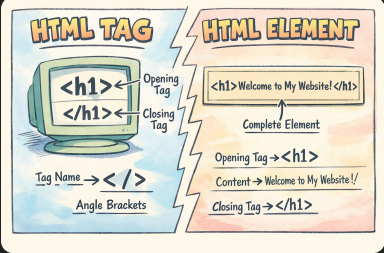
What’s an Opening Tag, Closing Tag, and Content?
<p> This is a dummy paragraph </p>
Let’s break this down:
<p>→ opening tag</p>→ closing tagThis is a dummy paragraph→ content
Together, they form a complete unit.
You can think of it like a box:
The opening tag opens the box
The content sits inside
The closing tag closes the box
What is an HTML Element?
A major misconception is thinking <p> is an HTML element (which isn’t)
<p> and </p> are just tags.
An element comprises tag + content (not the tags alone ).
Tags are the building blocks, but an element is the complete structure formed when tags wrap content.
<p> I am learning HTML</p>
This entire line is an HTML element.
Types of tags: Container and Self-closing tags
There are basically two types of tags :
Container tags: These tags come in pairs, so they will always have an opening and a closing tag.
Self-closing or Void Elements: These tags have an opening tag but need not have a closing tag. eg
<br> , <hr> , <input>etcThese tags don’t need content inside them. They exist on their own without wrapping around texts.
As we have now understood that a tag, along with text, is an HTML element. So now let’s discuss the types of HTML elements:
Block Level vs Inline Elements
HTML elements behave differently on a page.
Block-Level Elements
Some take up the full width even though the content inside them is barely 2-3 words.
So the next element will always start on a new line.
In short, block elements stack vertically, like boxes placed one below another.eg:
<p>This is a paragraph </p>
<h1> I am the biggest heading </h1>
<div> I am a container </div>
<ul>
    <li> This is an unordered list </li>
    <li> "li" represent list items </li>
</ul>
Inline Elements
These take up only as much as needed.
Other elements can stay in the same line.
In short, inline elements flow inside a line, just like words in a sentence.eg:
<span> Dummy Text </span>
<strong> This text will be displayed as bold </strong>
<a> This is an anchor tag used for links </a>
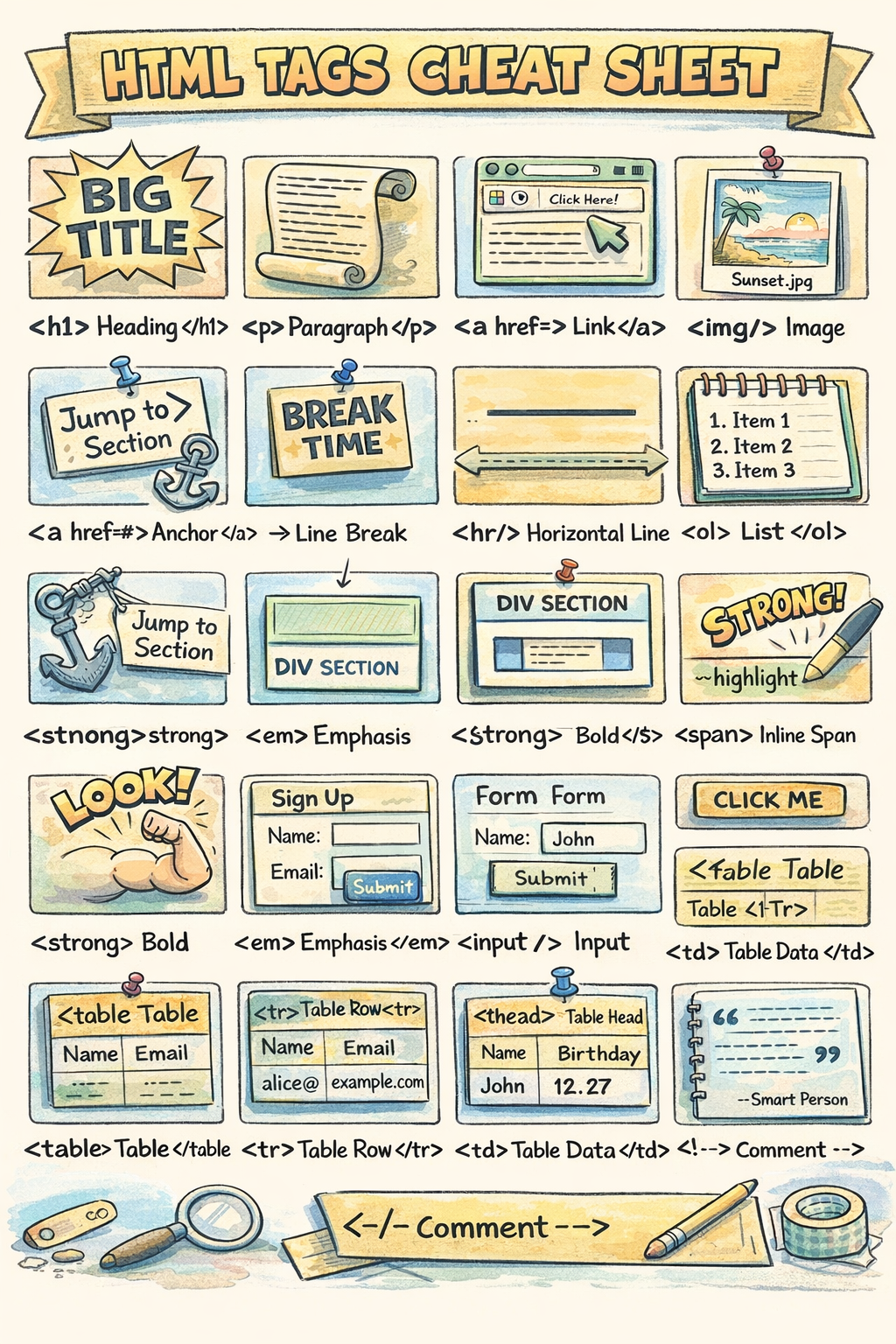
Now that I have bombarded you with random tag names, let me introduce you to the most commonly used tags:
Commonly Used HTML Tags:
<h1> to <h6>   → Headings
<p>            → Paragraph
<div>          → Section or container
<span>         → Inline text styling
<a>            → Links
<img>          → Images
<button>       → Buttons
<table>        → Table
<form>         → Form
Rather than randomly reading about tags, let's try to create an HTML webpage:
Putting Your First Webpage Together
<!DOCTYPE html>
<html>
    <head>
        <title>My First Page</title>
    </head>
    <body>
        <h1>Hello World!</h1>
        <p>This is my first website.</p>
    </body>
</html>
<!DOCTYPE html>: Tells the browser, "Hey, this is an HTML document."<html>: The root container. Everything lives inside this.<head>: Information for the browser (like the page title) that isn't shown on the main screen.<body>: The visible part. This is where your<h1>,<p>, and images go!
Tip for Beginners
Right-click on this very webpage, select Inspect, and look at the "Elements" tab. You will see the HTML skeleton of this site right before your eyes!